 1-800-537-2296
 sales@versitron.com



The Power of Single Fiber Media Converters : Maximizing Network Efficiency
Single Fiber Media Converters
As fiber optic networks continue to expand, organizations are constantly looking for ways to increase network capacity while making the most of existing infrastructure. In many installations, adding new fiber cables can be expensive, disruptive, or simply impractical. Single fiber media converters offer an efficient alternative by allowing bidirectional Ethernet communication over a single optical fiber.

Using Wavelength Division Multiplexing (WDM) technology, these converters transmit and receive data simultaneously on one fiber strand by assigning different wavelengths to each direction of communication. This approach reduces fiber requirements without sacrificing network performance, making single fiber media converters a practical solution for enterprise networks, industrial facilities, surveillance systems, transportation infrastructure, utilities, and government communications.
Whether extending Ethernet to a remote building, connecting IP surveillance cameras, or modernizing an existing fiber network, single fiber media converters help organizations maximize the value of their fiber infrastructure.
What Is a Single Fiber Media Converter?
A single fiber media converter is a networking device that converts Ethernet signals transmitted over copper cabling into optical signals for transmission across a single strand of fiber optic cable.
Unlike conventional duplex fiber systems that require one fiber for transmitting and another for receiving, single fiber media converters use Wavelength Division Multiplexing (WDM) to send data in both directions over one fiber.
This design reduces the amount of fiber required while maintaining full-duplex Ethernet communication.
At each end of the fiber link, matched converter pairs use complementary optical wavelengths to transmit and receive data.
A simplified connection looks like this:
Ethernet Device
↓
Single Fiber Media Converter
↓
One Strand of Fiber
↓
Matching Single Fiber Media Converter
↓
Remote Ethernet Device
This architecture makes efficient use of existing fiber infrastructure while supporting reliable Ethernet connectivity.
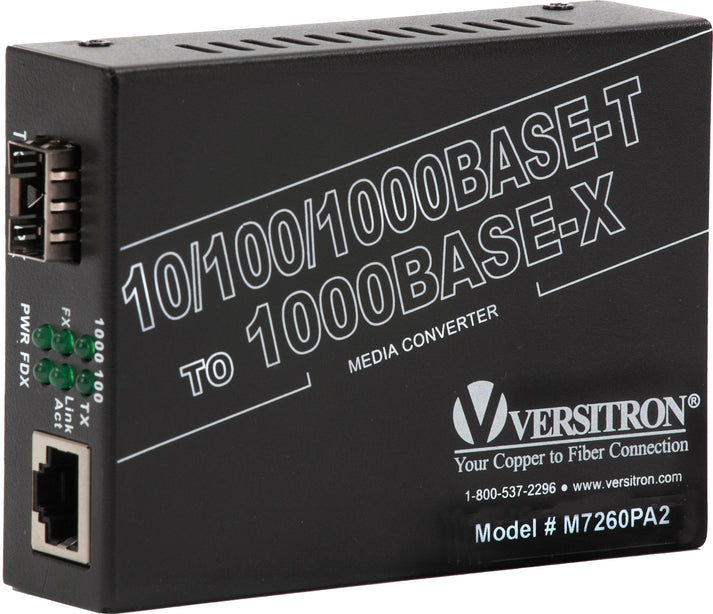
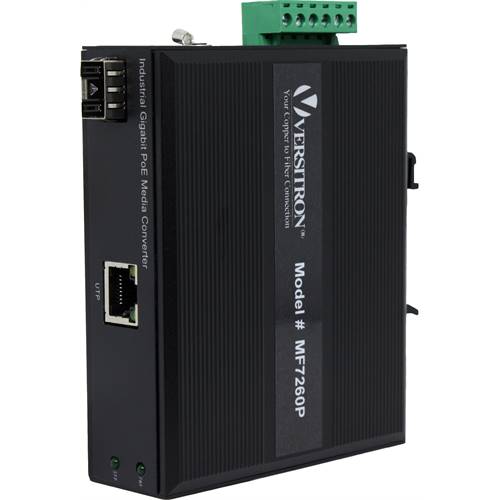
Explore Our Single Fiber Media Converters




How WDM Technology Works
The key to single fiber communication is Wavelength Division Multiplexing.
Instead of using separate fibers for transmitting and receiving data, WDM assigns different optical wavelengths to each direction of communication.
For example:
- One converter may transmit at 1310 nm and receive at 1550 nm.
- Its matching converter performs the opposite function, transmitting at 1550 nm and receiving at 1310 nm.
Because each wavelength travels independently over the same fiber, bidirectional communication can occur simultaneously without interference.
For this reason, single fiber media converters are normally installed as matched pairs.
Selecting the correct wavelength pair is essential to ensure proper communication.
Why Use a Single Fiber Instead of Two?
One of the primary advantages of single fiber technology is improved utilization of existing fiber infrastructure.
Many facilities have a limited number of available fiber strands between buildings or equipment rooms.
Installing additional fiber may involve:
- Underground construction
- Conduit expansion
- New cable installation
- Increased labor costs
- Service interruptions
By using one fiber instead of two, organizations can often expand network capacity without adding additional fiber cables.
This can reduce installation costs while preserving spare fibers for future projects.
Single Fiber vs. Duplex Fiber
Both single fiber and duplex fiber media converters have important roles in fiber optic networking.
The appropriate choice depends on the available infrastructure and system requirements.
Single Fiber Media Converters
Typically used when:
- Only one fiber strand is available
- Existing fiber capacity must be conserved
- Expanding legacy fiber infrastructure
- New fiber installation is difficult or expensive
Duplex Fiber Media Converters
Typically used when:
- Two fiber strands are readily available
- Existing duplex infrastructure is already installed
- Standard duplex optical equipment is being deployed
Neither technology is inherently better.
The best solution depends on the network architecture and available fiber resources.
Understanding Matched Converter Pairs
A common source of confusion involves the use of wavelength pairs.
Single fiber media converters are not interchangeable.
Each converter is designed to operate with its complementary partner.
For example:
Converter A
Transmit: 1310 nm
Receive: 1550 nm
works with
Converter B
Transmit: 1550 nm
Receive: 1310 nm
Installing two identical converters on the same link will generally prevent communication because both units would attempt to transmit and receive on the same wavelengths.
For this reason, manufacturers typically identify converters as complementary A/B or Tx/Rx wavelength pairs.
Always verify compatibility before installation.
Common Types of Single Fiber Media Converters
Single fiber media converters are available in several configurations to support different network requirements.
Fast Ethernet Media Converters
Designed for 10/100 Mbps Ethernet networks.
Often used for:
- Building automation
- Industrial equipment
- Legacy network upgrades
- Security systems
Gigabit Media Converters
Support higher-speed Gigabit Ethernet networks.
Suitable for:
- Enterprise LANs
- IP surveillance
- Campus networks
- High-bandwidth applications
PoE and PoE+ Media Converters
Provide both fiber connectivity and Power over Ethernet to remote devices such as:
- IP security cameras
- Wireless access points
- Access control equipment
- Networked sensors
These models simplify installations by delivering power and network connectivity over a single Ethernet cable at the remote endpoint.
Industrial Media Converters
Industrial models are designed for demanding environments where temperature, vibration, dust, or electrical noise may exceed the limits of standard commercial equipment.
Typical applications include:
- Manufacturing
- Transportation
- Utility infrastructure
- Oil and gas facilities
- Outdoor communication cabinets
Typical Applications
Single fiber media converters support a wide variety of Ethernet networking applications.
Common examples include:
Enterprise Networks
Extending Ethernet between buildings while minimizing fiber usage.
IP Surveillance
Connecting remote IP cameras across existing fiber infrastructure.
Industrial Automation
Providing Ethernet communication between production equipment, controllers, and monitoring systems.
Transportation
Supporting communication links for traffic management, rail systems, and airport operations.
Utilities
Connecting substations, pumping stations, and remote facilities using existing fiber resources.
Government Facilities
Expanding secure network infrastructure across campuses while maximizing available fiber capacity.
Why Fiber Conservation Matters
Fiber optic cable represents a valuable infrastructure investment.
In many older installations, only a limited number of fiber strands were originally installed.
Years later, organizations often discover that additional communication systems require more network connections than originally anticipated.
Instead of replacing existing fiber cables, single fiber media converters allow one strand to carry bidirectional Ethernet traffic.
This helps preserve unused fibers for future expansion while reducing the need for costly construction projects.
For organizations with constrained fiber resources, this can provide significant operational and economic advantages.
Choosing Between Commercial and Industrial Models
Not every network environment requires the same level of environmental protection.
Commercial media converters are generally intended for climate-controlled equipment rooms and office environments.
Industrial media converters are typically selected for installations exposed to:
- Wide temperature variations
- Electrical interference
- Mechanical vibration
- Outdoor cabinets
- Industrial facilities
Selecting equipment appropriate for the installation environment helps support long-term network reliability.
Transmission Distance Considerations
One of the primary advantages of fiber optic communication is its ability to support reliable Ethernet connectivity over distances far beyond the limitations of copper cabling.
The maximum transmission distance of a single fiber media converter depends on several factors, including:
- Fiber type
- Optical wavelength
- Transceiver design
- Network speed
- Optical budget
- Connector quality
Different converter models are designed for different distance requirements. Before deployment, always verify the supported transmission distance for the specific converter model being installed.
Proper fiber installation and connector cleanliness also play an important role in maintaining reliable communication over long distances.
Understanding Fiber Connector Options
Single fiber media converters are available with several interface options depending on the installation requirements.
Fixed Fiber Connectors
Many converters include built-in fiber connectors such as:
- SC connectors
- ST connectors
These provide a straightforward solution for installations where the optical interface is predetermined.
SFP-Based Media Converters
Some media converters incorporate Small Form-factor Pluggable (SFP) slots.
An SFP-based design allows installers to select optical transceivers that match:
- Required transmission distance
- Fiber type
- Optical wavelength
- Connector style
This flexibility can simplify inventory management while allowing networks to adapt as requirements change.
Single Fiber PoE Media Converters
Many remote network devices require both Ethernet connectivity and electrical power.
Examples include:
- IP surveillance cameras
- Wireless access points
- Access control devices
- Remote network sensors
- Industrial Ethernet equipment
A PoE or PoE+ single fiber media converter combines two functions:
- Fiber-to-Ethernet conversion
- Power over Ethernet delivery
This allows a single Ethernet cable at the remote location to provide both network connectivity and electrical power to the connected device.
Reducing separate power wiring can simplify installations while minimizing equipment at remote sites.
Industrial Applications
Industrial communication systems often operate in environments that differ significantly from traditional office networks.
Potential conditions include:
- High electrical noise
- Wide temperature fluctuations
- Dust
- Moisture
- Mechanical vibration
Industrial single fiber media converters are designed for these types of environments and are commonly deployed in:
- Manufacturing facilities
- Utility substations
- Water treatment plants
- Transportation systems
- Outdoor communication cabinets
- Energy infrastructure
Selecting an industrial model when environmental conditions require it can improve long-term network reliability.
Extending IP Surveillance Networks
Fiber optic infrastructure is frequently used to connect surveillance equipment across large facilities.
Examples include:
- Campus security
- Industrial plants
- Transportation systems
- Municipal surveillance
- Critical infrastructure
A typical deployment may look like:
Network Switch
↓
Single Fiber Media Converter
↓
Single Fiber Link
↓
Remote Single Fiber Media Converter
↓
PoE Switch or IP Camera
This architecture allows Ethernet communication to reach remote surveillance devices while using only one optical fiber between locations.
Network Reliability Features
Many media converters include features that assist with maintaining reliable network operation.
Depending on the model, these may include functions such as:
- Auto-negotiation
- Auto MDI/MDI-X
- Link Fault Pass-Through
- Far-End Fault Detection
- Buffer memory
These features can simplify installation and help network administrators identify communication problems more efficiently.
Always verify which capabilities are supported by the selected media converter model before deployment.
Auto-Negotiation
Auto-negotiation allows connected Ethernet devices to automatically determine compatible communication settings.
Depending on the equipment, this may include selecting:
- Network speed
- Duplex operation
Automatic negotiation can simplify installation while helping ensure proper communication between connected devices.
Auto MDI/MDI-X
Auto MDI/MDI-X automatically detects the wiring configuration of an Ethernet connection.
This eliminates the need to determine whether a straight-through or crossover cable is required for many Ethernet connections.
The result is a simpler installation process with fewer wiring errors.
Link Fault Pass-Through and Far-End Fault Detection
Troubleshooting fiber optic communication systems can be challenging when failures occur at remote locations.
Many media converters incorporate diagnostic features such as Link Fault Pass-Through (LFPT) or Far-End Fault Detection.
These functions help communicate link status between the copper and fiber interfaces, allowing administrators to identify communication failures more quickly.
Rather than leaving one side of the network appearing operational while the opposite side has failed, these features can improve fault visibility and reduce troubleshooting time.
The specific diagnostic capabilities vary by product model.
Best Practices for Installing Single Fiber Media Converters
Proper planning helps ensure reliable long-term network performance.
Recommended installation practices include:
- Verify wavelength compatibility before connecting converter pairs.
- Label converter pairs clearly.
- Confirm that complementary transmit and receive wavelengths are used.
- Clean fiber connectors before installation.
- Observe minimum bend radius requirements for fiber optic cable.
- Verify optical loss if communication problems occur.
- Protect fiber patch cords from excessive strain.
- Document fiber routes and converter locations.
Good installation practices simplify future maintenance while reducing service interruptions.
Common Installation Mistakes
Several common mistakes can prevent a single fiber link from operating correctly.
Installing the Wrong Converter Pair
Using two converters with identical transmit and receive wavelengths will generally prevent communication.
Always install complementary wavelength pairs.
Confusing Single Fiber with Duplex Fiber
Single fiber media converters require one optical fiber.
Traditional duplex converters require two.
The two systems are not directly interchangeable.
Selecting the Wrong Fiber Type
Verify whether the equipment is designed for:
- Single-mode fiber
- Multimode fiber
Using the wrong fiber type may prevent reliable operation.
Ignoring Transmission Distance
Every optical system has distance limitations.
Always verify that the selected converter supports the required fiber length.
Mixing Connector Types Without Planning
Ensure that connector styles match the installed fiber infrastructure or that appropriate adapters are available.
Selecting the Right Single Fiber Media Converter
Before selecting a media converter, consider the following questions:
What Ethernet speed is required?
- 10/100 Mbps
- Gigabit Ethernet
What type of fiber is installed?
- Single-mode
- Multimode
How far must the network extend?
Select equipment designed for the required optical distance.
Will remote devices require Power over Ethernet?
If so, consider PoE or PoE+ media converters.
Is the installation indoors or industrial?
Environmental conditions influence equipment selection.
Will future expansion be required?
Planning for growth can simplify future upgrades.
Frequently Asked Questions
Why use one fiber instead of two?
Single fiber media converters reduce the number of optical fibers required while maintaining full-duplex Ethernet communication through WDM technology.
Do both converters use the same wavelength?
No.
Each converter uses complementary transmit and receive wavelengths so that bidirectional communication can occur over one fiber.
Can I connect any two single fiber converters together?
No.
Matched wavelength pairs must be used.
Always verify compatibility before installation.
Are single fiber media converters slower than duplex converters?
Not necessarily.
Performance depends on the specifications of the individual media converter rather than whether one or two fibers are used.
When should I choose a single fiber solution?
Single fiber media converters are particularly useful when available fiber strands are limited or when expanding an existing fiber optic network without installing additional cable.
Conclusion
Single fiber media converters provide an efficient way to extend Ethernet communication while maximizing the use of existing fiber optic infrastructure.
By using Wavelength Division Multiplexing (WDM) technology, they enable simultaneous bidirectional communication over a single optical fiber, helping organizations conserve valuable fiber resources and reduce installation costs.
Whether supporting enterprise networks, industrial automation, IP surveillance, transportation systems, utilities, or government facilities, single fiber media converters offer a practical solution for reliable long-distance Ethernet connectivity.
Selecting the right converter requires careful consideration of network speed, transmission distance, fiber type, connector options, environmental conditions, and Power over Ethernet requirements. Understanding how wavelength pairs operate and following sound installation practices helps ensure reliable performance throughout the life of the network.
As organizations continue expanding their fiber optic infrastructure, single fiber media converters remain a versatile and cost-effective option for building scalable, future-ready Ethernet networks while making the most of every available fiber strand.


